 f1406a3334
adds documentation for sharepoint lists.
should go in after: https://github.com/alcionai/corso/pull/5048

#### Does this PR need a docs update or release note?

- [x] ✅ Yes, it's included
- [ ] 🕐 Yes, but in a later PR
- [ ] ⛔ No

#### Type of change

<!--- Please check the type of change your PR introduces: --->
- [ ] 🌻 Feature
- [ ] 🐛 Bugfix
- [x] 🗺️ Documentation
- [ ] 🤖 Supportability/Tests
- [ ] 💻 CI/Deployment
- [ ] 🧹 Tech Debt/Cleanup

#### Issue(s)
#4754

#### Test Plan

<!-- How will this be tested prior to merging.-->
- [ ] 💪 Manual
- [ ] ⚡ Unit test
- [ ] 💚 E2E
3.3 KiB
Bugs and new features
import Tabs from '@theme/Tabs'; import TabItem from '@theme/TabItem';
You can learn more about the Corso roadmap and how to interpret it here.
If you run into a bug or have feature requests, please file a GitHub issue
and attach the bug or enhancement label to the issue. When filing bugs, please run Corso with
--log-level debug --hide-progress --mask-sensitive-data and add the logs to the bug report. You can find more
information about where logs are stored in the log files section in setup docs.
Memory Issues
Corso's memory usage depends on the size of the resource being backed up. The maximum memory usage occurs during full backups (usually the first backup) vs. later incremental backups. If you believe Corso is using unexpected amounts of memory, please run Corso with the following options:
- Prefix the Corso run with
GODEBUG=gctrace=1to get GC (Garbage Collection) logs - Add
--log-level debug --hide-progress --mask-sensitive-data - Redirect output to a new log file (for example,
corso-gc.log)
# Connect to the Corso Repository
GODEBUG=gctrace=1 .\corso <command> -hide-progress --log-level debug --mask-sensitive-data `
  <command-options> > corso-gc.log 2>&1
# Connect to the Corso Repository
GODEBUG=gctrace=1 ./corso <command> -hide-progress --log-level debug --mask-sensitive-data \
  <command-options> > corso-gc.log 2>&1
Next, file a GitHub issue with the two log files
(default log file and corso-gc.log, the Corso GC log file, from above) and
information on the size of the Exchange mailbox, OneDrive location, or SharePoint site that you are having an issue
with.
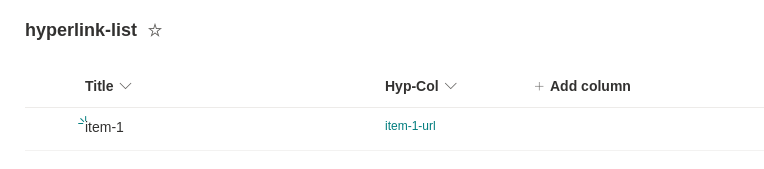
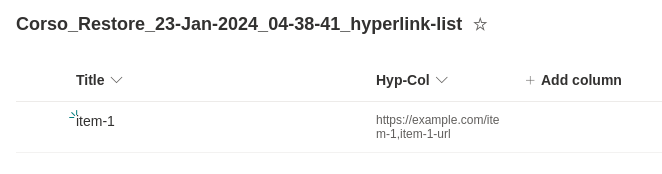
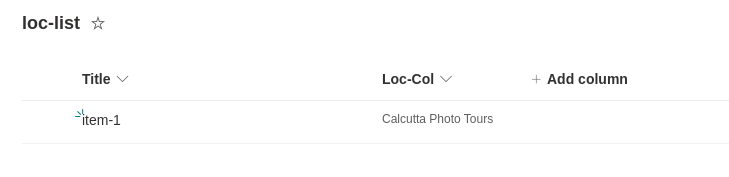
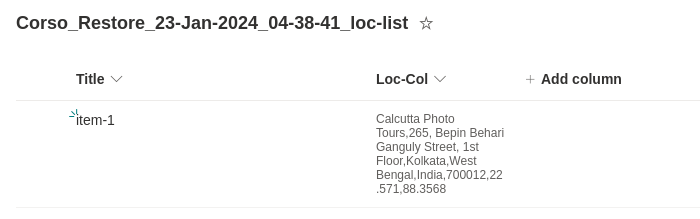
Sharepoint List Anomalies
Some columns in sharepoint list aren't recognizable from the GRAPH API response. More about this issue here.
Therefore while restore of these columns, we default them to as text fields.
The value they hold are therefore not reinstated to the way the originally were.
Originally created hyperlink column in Site
Restored hyperlink column
Issue tracker for hyperlink column support
To track progress, visit.
Originally created location column in Site
Restored location column
Issue tracker for location column support
To track progress, visit.