
7.5 KiB
slug, title, description, authors, tags, date, image
| slug | title | description | authors | tags | date | image | |||
|---|---|---|---|---|---|---|---|---|---|
| incremental-backups-pt1 | Speeding up Microsoft 365 backups with delta tokens | Recent additions to Corso have reduced the duration of backups after the first backup by taking advantage of Microsoft’s delta query API. Doing so allows Corso to retrieve only the changes to the user’s data since the last backup instead of having to retrieve all items with the Graph API. However, implementing backups in this manner required us to play a few tricks with the Corso implementation, so we thought we’d share them here. | amartinez |
|
2023-4-1 | ./images/incremental-encoder.jpg |

Full Microsoft 365 backups can take a long time, especially since Microsoft throttles the number of requests an application can make in a given window of time. Recent additions to Corso have reduced the duration of backups after the first backup by taking advantage of Microsoft’s delta query API. Doing so allows Corso to retrieve only the changes to the user’s data since the last backup instead of having to retrieve all items with the Graph API. However, implementing backups in this manner required us to play a few tricks with the Corso implementation, so we thought we’d share them here.
Background
Before we dive into the details of how incremental backups work, it’s useful to have some knowledge of how delta queries work in the Microsoft Graph API and how data is laid out in Corso backups.
Microsoft delta queries
Microsoft provides a delta query API that allows developers to get only the changes to the endpoint since the last query was made. The API represents the idea of the “last query” with an opaque token that's returned when the set of items is done being listed. For example, if a developer wants to get a delta token for a specific email folder, the developer would first list all the items in the folder using the delta endpoint. On the final page of item results from the endpoint, the Graph API would return a token that could be used to retrieve future updates.
All returned tokens represent a point in time and are independent from each other. This means that getting token a1 at time t1, making some changes, and then getting another token a2 at time t2 would give distinct tokens. Requesting the changes from token a1 would always give the changes made after time t1 including those after time t2. Requesting changes from token a2 would give only the changes made after time t2. Tokens eventually expire though, so waiting a long time between backups (e.x. weeks) may cause all items to be enumerated again.
Corso full backups, incremental backups, and backup layout
Before we get into the nuts and bolts of how Corso uses the Microsoft delta query API, it’s important to first define what’s in a backup and the terminology we’ll be using throughout this post.
Backup layout
Internally, a single Corso backup consists of three main parts: a kopia manifest that Corso uses as the root object of the backup (BackupModel), a kopia snapshot of indexing information for Corso, and a kopia snapshot of the item data in the backup. The BackupModel contains summary information about the status of the backup (did it have errors, how many items did it backup, etc) and pointers to the two snapshots that contain information.
The snapshot with indexing information contains the data output during a
corso backup details command and is used to filter the set of restored items
during restore commands. The snapshot contains one entry for every backed up
M365 item in the backup.
The snapshot of item data contains the raw bytes that Corso backed up from M365.
Internally, Corso uses a file hierarchy in kopia that closely mirrors the layout
of the data in M365. For example, if the user has a file in the OneDrive folder
work/important then Corso creates a kopia path
<tenant ID>/onedrive/<user ID>/files/<drive ID>/root/work/important for that
file.
Corso also stores a few extra bits of metadata to help with incremental backups.
Most importantly, it stores the Graph API’s delta tokens retrieved during the
backup process as well as a mapping relating the current M365 folder IDs to
their paths. This information is stored with different path prefixes (ex. uses
onedriveMetadata instead of onedrive) to make it straightforward to separate out from
backed up item data.
Terminology
Full backups are backups where all of the data being backed up is fetched from M365 with the Graph API. These backups may take a long time to complete (we’ve seen backups that run for 20+ hours) due to throttling imposed by Microsoft 365. For the purposes of this blog, incremental backups are backups where Corso fetches only a subset of items from M365. Ideally Corso would fetch only the items that change, though there may be reasons it needs to fetch more data.
Whether Corso does a full backup or an incremental backup, the resulting Corso backup has a listing of all items stored in M365 (what we refer to as indexing information). This means there’s no “chaining” between backups and restoring an item from a backup requires only accessing information contained in or referenced directly by the backup passed in to the restore command. This makes backups independent from each other once they’ve been created, so we’ll refer to them as independent backups for the rest of this post.
Both independent backups and chained backups have the same information. Having independent backups generally creates more complexity when making a new backup while chained backups generally have more complexity during restore and backup deletion. Independent backups have more complexity when creating the backup as indexing information and item data references for deduplicated data may need to be sourced from previous backups. Chained backups have more complex restore as multiple backups may need to be searched for the item being restored. They also have more complex backup deletion as an item’s data can only be deleted if no backups in any chain refer to it. The figure below gives a high-level overview of the differences between independent backups and chained backups.
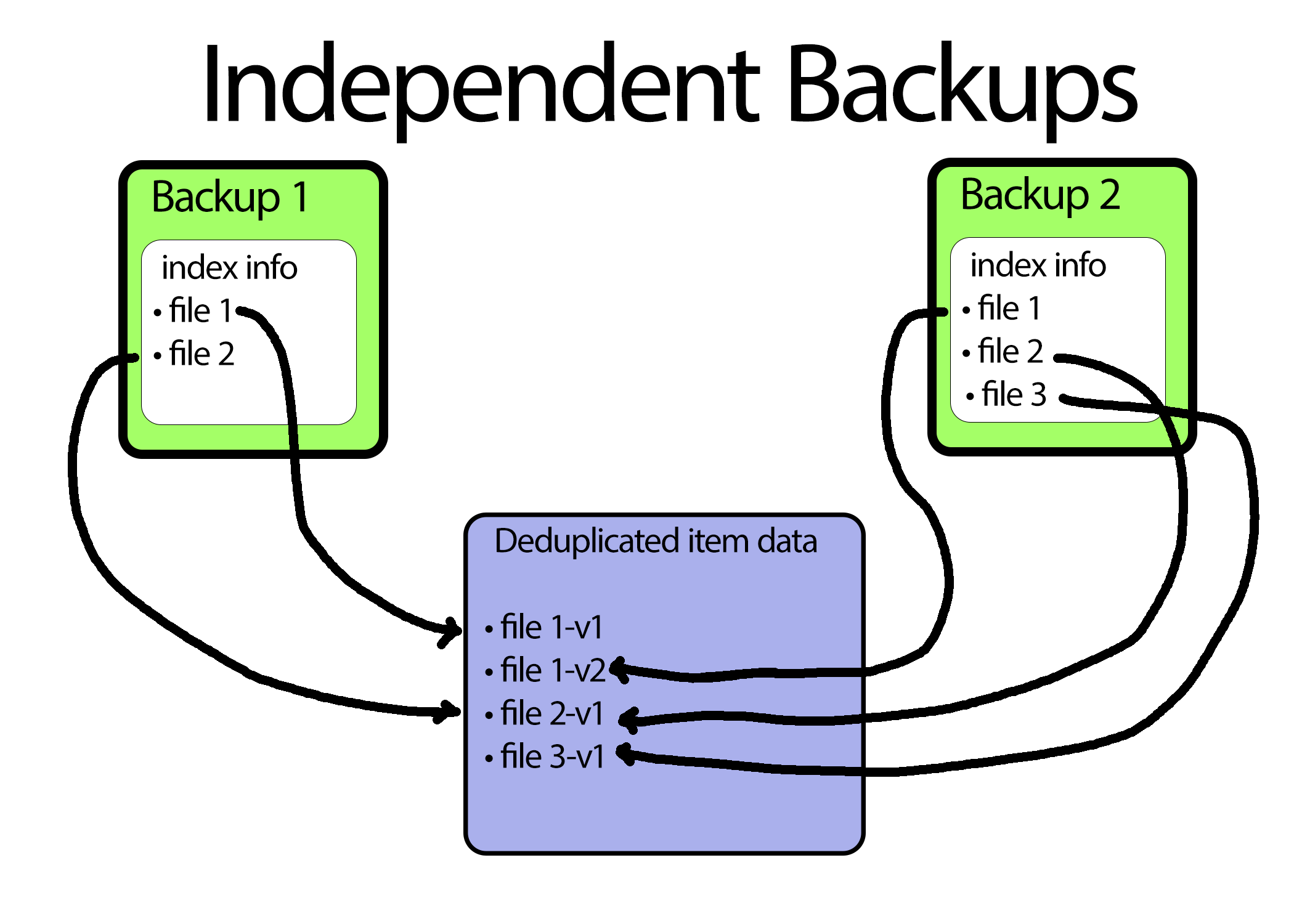 both images below show how data would be stored if the user backed up two files on their first backup and then made a
new file and updated file1 before taking a second backup
both images below show how data would be stored if the user backed up two files on their first backup and then made a
new file and updated file1 before taking a second backup
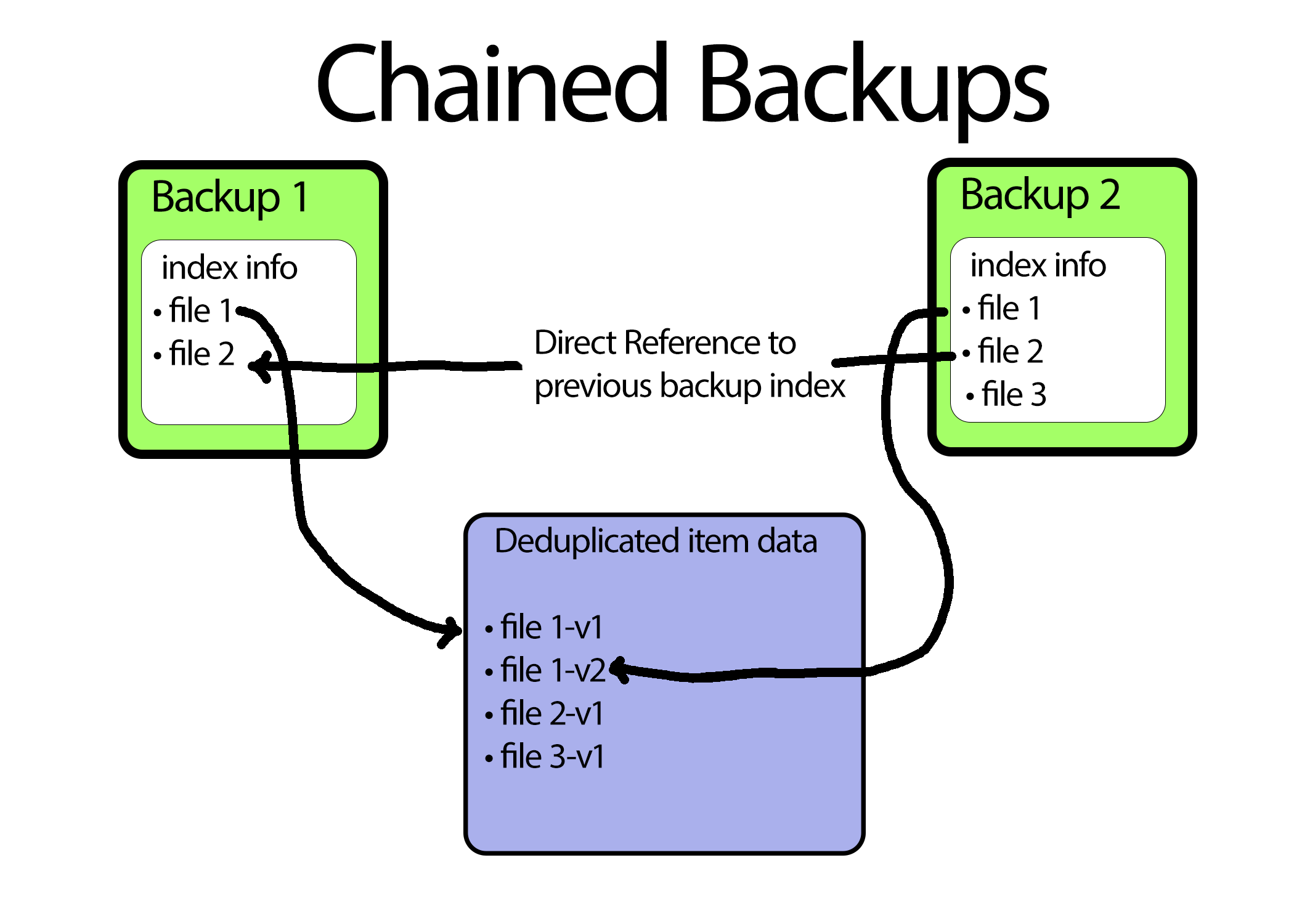
Although having a full listing of all items present at the time of the backup in each backups sounds wasteful, Corso takes advantage of the data deduplication provided by kopia to only store one copy of the underlying data for backed up items. What this really means is each Corso backup has a complete set of indexing information. This gives Corso the best of both worlds; allowing completed backups to have independent indexing information and life cycles from each other while still minimizing the amount of item data stored.
💡 In part 2 of our series, we’ll cover Incremental backups in action.
Try Corso Today
Corso implements compression, deduplication and incremental backups to give you the best backup performance. Check our quickstart guide to see how to get started.